Posts

[Day 188] Setting up automatically updated monitoring UI using streamlit
Image
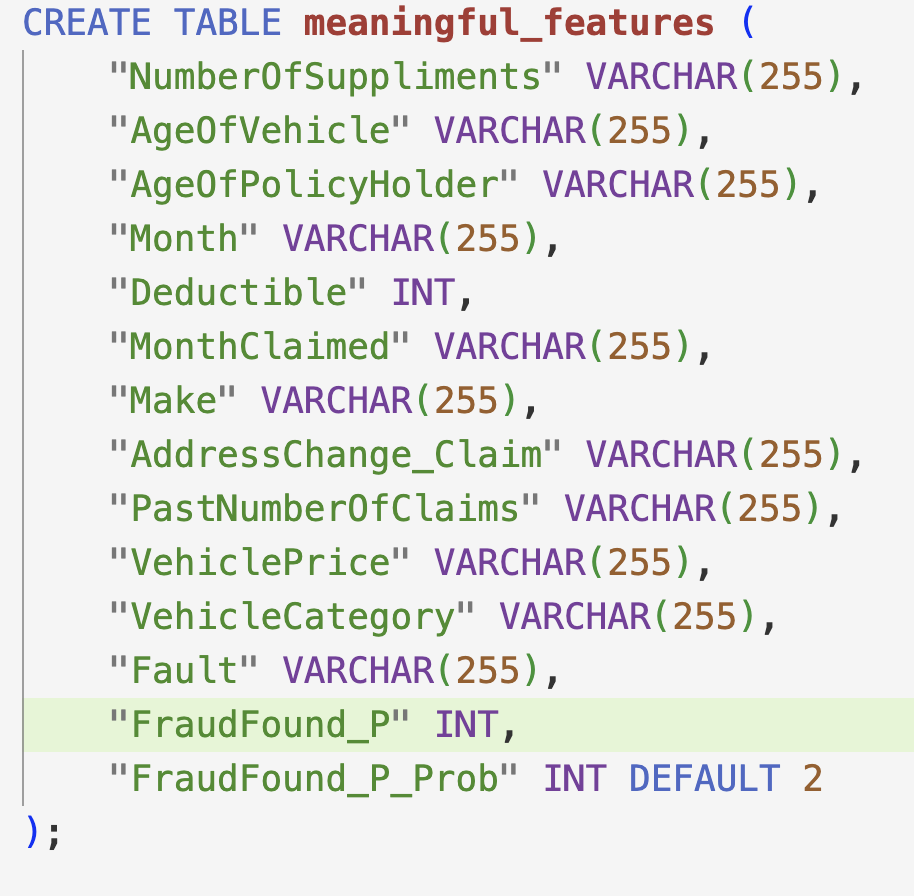
 Hello :) Today is Day 188! A quick summary of today: setting up postgres properly creating and hosting a monitoring interface using streamlit creating a Grafana dashboard setting up a batch model prediction flow in prefect All code from previous days and today is on my repo . First, setting up a better way to upload data to postgres Before, everytime I ran docker the script checked if I had inserted data into postgres. Now I set up a proper sql script that inserts data once and I am set up (as long as I do not delete the built container of course) I put all the sql and commands I used to upload the data in the postgres folder in my repo. I first create the tables (pic is truncated) And I also added a default column for FraudFound_P_prob just in case the user wants to get probabilities when they run a pred model.  I uploaded 2 datasets to postgres - the above one, and one ready for the balanced random forest classifier model - it is the same as the above one but all vars are i...

[Day 187] Setting up postgres, pgAdmin, Grafana and FastAPI to run in Docker

Image
 Hello :) Today is Day 187! A quick summary of today: creating a docker container with postgres db, pgadmin, grafana and fastapi a small Glaswegian project update Docker and I are becoming closer and closer friends ^^ Before going into that, I will go in order of things I did today. All files and code from today, and up until this point are on my repo . Firstly, monitoring with Evidently I learned about Evidently from the mlops zoomcamp, and it looked very easy to use, so I gave it a try.  In order to generate the reports, I decided to use my data before creating dummies. Because the balanced random forest classifier model uses a dataset with all dummies (all categorical data). So in order for the monitoring to be a bit more understandable, I decided to use the 'pre-dummy' dataset, and below are some parts of the generated reports by Evidently.  There is variable info: Missing values: Drift: Model performance: The reports (as html) are on my repo in the monitoring/evident...

[Day 186] Prefect cloud, model serving with FastAPI, and SHAP values

Image
 Hello :) Today is Day 186! A quick summary of today: using FastAPI for model serving, and running it in Docker starting to think about model monitoring All code, pictures are on my github repo . Firstly, yesterday I was having version issues between prefect and prefect-gcp - fixed that with the help of Prefect's community slack, and now I can run one file which runs both flows - upload_to_gcs flow and train_model flow. I also realised that for solo (and mini project) devs Prefect cloud is free, so I uploaded my flows to there just to be a bit safer - not having everything locally only.  The UI is the same, but it is in the cloud.  Next, serving the model for inference I decided to use FastAPI as it seems very easy to create and run a server. Also when I run a fastapi server, there is a nice /docs page where I can quickly and easily test my endpoints.  It is pretty basic for now, and I just need to improve the prefict_fraud function. I also set up the server to run i...

[Day 185] Using prefect as my orchestrator for my MLOps project

Image
 Hello :) Today is Day 185! A quick summary of today: creating a flow for model training creating a flow for uploading data to GCS Well, I decided to go with Prefect as my orchestrator. I have little experience using it and I liked it, so went with it.  All the code from today is on my repo . As seen from the pic, I ran jobs many times and have many successes and failures.  The first flow (as they are called in prefect) I created is for model training.  This is an example visualisation of the flow from one of the runs: It contains 4 tasks: read data (not from GCS, I need to make it read from GCS) split data get best params for the model from mlflow train the model, and produce reports on it The reports are quite nice as we can use markdown and python f-strings together to make them: Model report: MLflow info: Deploy instructions: Instead of going to mlflow to get info, I tried to make it a bit easier and clearer on how to get a model, and also showing basic performan...

[Day 184] Mlflow experiment tracking and trying out metaflow

Image
 Hello :) Today is Day 184! A quick summary of today: got various experiments ran and saved in my GCP mlflow server set up and tried out metaflow for MLOps orchestration Today I had to re-create my GCP VM because of a python version issue. So after starting a VM with python 3.10 I could use mlflow's most current logging functionality.  I ran a few experiements and the currently saved are: I will select a model solely based on recall - being able to detect the most fraud cases out of all fraud cases. Based on that, so far (after finding optimal params) the Balanced RF Classifier is the best -> recall being 0.92.  The most recent code and files are in my repo .  Today I did some refactoring to make things look nicer -> added a utils folder with some helper functions that I used a lot throughout notebooks. The current are log_model_performance and get_best_params which log a model run to mlflow, and then load the params of a model from mlflow.  Another t...

[Day 183] Failing to install Kubeflow, and setting up mlflow on GCP

Image
 Hello :) Today is Day 183! Today is actually past the half-way point in this blog journey. 182 days to go! A quick summary of today: setting up mlflow for experiment tracking in GCP Today I started looking at tools I can use for my MLOps zoomcamp project. I used Mage for the data engineering project so now for an orchestrator I want to try another tool. My first idea (which I had on my mind for a while) is Kubeflow. Tldr - it is so hard to set up locally and I could not find a guide that clearly explains how :(  I had this  1hr video in my 'to watch' for a bit and it goes over building an ML pipeline in kubeflow however it does not go over how to install from kubeflow from 0 to what is needed in the video. Then I started looking in kubeflow's documentation - I tried to set it up on GCP but I could not and actually was a bit adamant to use it because it explicitly said that the free credits on GCP do not cover kubeflow hosting costs. So ~ I started looking into local depl...

[Day 182] Learning about feature selection in fraud detection and finding a classifier model with low recall

Image
 Hello :) Today is Day 182! A quick summary of today: learning about IV, WoE, and finding a best model for an imbalanced insurance fraud imbalanced dataset The time has come to start thinking about the project for MLOps zoomcamp.  I was looking around for some interesting dataset related to PD (probability of default) or LGD (loss given default) or EAD (exposure at default), and I found this  notebook. Warning - it is fairly long. But inside I saw something that interested me - it talked about WoE and IV. It says that they are good estimators for evaluating features for fraud and similar classification tasks. This website's definition was the most clear. Weight of Evidence (WoE) It is a technique used in credit scoring and predictive modeling to assess the predictive power of independent variables relative to a dependent variable. Originating from the credit risk world, WoE measures the separation between "good" and "bad" customers. Here, "bad" custom...

[Day 181] Lending club data engineering project - Done

Image
 Hello :) Today is Day 181! A quick summary of today: completed and documented my data engineering project Everything is on my github repo , but below I will provide an overview. A diagram overview of the tech used: Raw Lending Club data from Kaggle Mage is used to orchestrate an end to end process including: extract data using kaggle's API and load it to the Google Cloud Storage (used as a data lake) create tables in BigQuery (used as a data warehouse) run dbt transformation jobs Terraform is used to manage and provision the infrastructure needed for the data pipeline on Google Cloud Platform dbt is used to transform the data into dimension tables, add data tests, and create data documentation Looker is used to create a visualisation dashboard For the dbt documentation, I was using dbt cloud IDE for the development, but to deploy a docs I needed to get its files, so the easiest way was to sync and run dbt locally. Setting up dbt to sync with local files was not hard, and this gave...

[Day 180] From Kaggle to BigQuery dimension tables - an end2end pipeline

Image
 Hello :) Today is Day 180! A quick summary of today: finished data modelling in dbt set up PROD in dbt set up automatic dbt job runs in mage created an end to end pipeline All code from today is on my github repo . 1. Settling down on a data model in dbt I went over a few different today, but I ended up with the above one. Because all my data is coming from 1 source I felt like, in order to avoid redundancy - I just decided to have dim_loans as the main table, and then have dim_borrower which includes just info about the borrower and dim_date just about the loan issue date. I also added data description fields, and some tests. The below pics are taken from the dbt generated documentation: dim_borrower dim_date dim_loans (image is truncated as there are many fields) 2. Setting up a PROD environment for dbt After I finally settled on a data modelling architecture, I created a PROD env to run all the models in a job. Not seen in the pic, but there is an 'API trigger' button which...